
Understanding row limits and ‘Others’ rows in Matomo reports
Matomo’s action reports show how visitors interact with your website, including page views, site searches, downloads, outlinks, and events.
Matomo builds these reports by processing raw tracking data and aggregating it into summary data during archiving. To keep this process scalable, limits control how much data is processed and stored. When these limits are reached, some data is aggregated into an Others row.
The way in which these limits are applied depends on the report and your Matomo version.
Page reports in Matomo 6
Matomo 6 introduces a new archiving process for the Page reports, namely Page URLs, Page Titles, Entry pages and Exit pages reports.
Previously, in Matomo 5 and earlier, page report limits were applied while building the hierarchy. This meant limits could be reached independently at different levels of the report.
New Page report archiving
From version 6, Matomo first retrieves pages ordered by their number of visits. A single limit controls the number of page results that are processed. Matomo then builds the report hierarchy from those results.
This means a highly visited page is no longer excluded simply because of where it appears within the Page URL or Page Title hierarchy. It also reduces the occurrence of Others because remaining rows that fall outside the configured row limit are grouped together into a single Others row.
With the new Matomo 6 archiving process, pages compete for the report-level row limit across the report. This makes the retained rows more representative of the highest-ranking pages overall and avoids multiple Others rows being generated throughout different levels of the hierarchy.
If the limit is 50,000 rows and the website has 50,000 unique Page URLs for the archived period, all 50,000 can be included in the report. If there are more Page URLs than the configured limit, Matomo prioritises the most visited pages and the remaining pages are aggregated into a single Others row.
How to enable the new Page report archiving process
When the new archiving process is enabled, it changes how page report data is archived and does not change the report functionality or whether you view the report as a flat or hierarchical table.
Matomo Cloud
The new archiving process is enabled by default in Matomo Cloud with a default Page report row limit of 50,000 rows. See Default row limits for Matomo Cloud reports.
If you need to report on more than 50,000 rows, contact Matomo Support to discuss your reporting requirements. Requests for a higher limit can be assessed based on specific use cases.
Matomo On-Premise
The new archiving process is enabled by default for new On-Premise installations.
If you upgraded an existing installation to Matomo 6, the new archiving process is disabled by default to preserve the previous archiving behaviour and row-limit settings. See the guide on changing report row limits.
Site search, Downloads, Outlinks, Events, and other action reports
Other action reports continue to use the same archiving process as before. These include site searches, downloads, outlinks, and events.
During archiving for these reports, Matomo applies row limits separately to its tables and subtables. The top-level table and subtables can also have different configured row limits. Rows therefore compete for inclusion only with other rows in the same level of the report rather than with every row in the report.
Why multiple Others rows can appear
Because row limits are applied separately to the top-level table and its subtables, an Others row can be created independently wherever a table or subtable exceeds its configured row limit. The report would then show multiple Others rows in different levels of the same report.
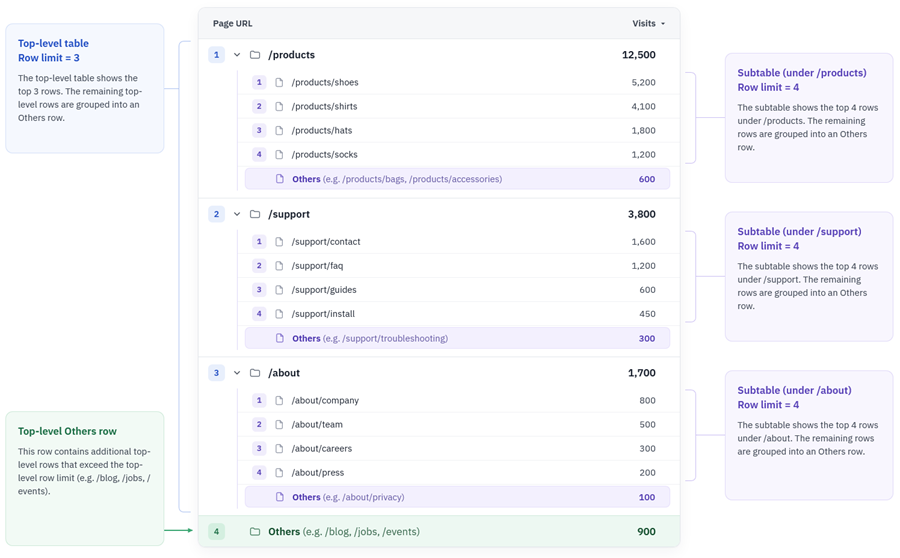
Matomo 6 Page reports work differently. With the new archiving process enabled, pages are prioritised by visits before the report hierarchy is built. If the number of pages exceeds the configured result limit, the remaining long-tail data is grouped into a single Others row.
This makes it easier to find and analyse your most important pages, with fewer Others rows obscuring your data.
Next steps
If the default row limits affect your reports, you have several options depending on your Matomo deployment and what you need to analyse.
- Even when rows are grouped into Others, you can still retrieve the underlying data. See How to extract data from the ‘Others’ row.
- Understand the Default row limits for Matomo Cloud reports.
- Change the row limits if you manage your own Matomo server.