
If you run analytics for a French audience, you might already know about the CNIL consent exemption. And you know that privacy requirements can slow everything down.
Getting GDPR-compliant analytics for France used to mean working through a detailed checklist, tweaking buried settings, and hoping you hadn’t missed anything.
Matomo’s new 1-Click CNIL compliance feature handles that automatically, so you can focus on your data, not your configuration.
The new feature helps you assess your current setup against CNIL consent exemption conditions, apply supported settings in one click, and see clearly what still needs your attention.
Reminder: you need to comply with CNIL requirements as soon as your audience includes people in France, even if your organisation isn’t French.
Why this matters
For many teams, the hard part isn’t choosing a privacy-first analytics platform. The hard part is configuring it correctly, documenting it clearly, and reducing the back and forth between marketing, implementation, and compliance team.
That changes with today’s release. Instead of reviewing settings one by one across different parts of Matomo, the 1-Click CNIL compliance feature reduces that friction at every stage:
- Fewer back-and-forths between marketing, development and privacy teams during setup.
- Less risk of misconfiguration, because the platform enforces the required settings rather than relying on a checklist.
- Easier to review for stakeholders and DPOs, with a clear compliance status per site and a self-assessment document built in.
- Faster to deploy across multiple sites, without repeating the same manual process each time.
This is especially useful for teams that need a faster and clearer path to a CNIL-aligned setup, without relying on scattered documentation or repeated manual reviews.
It’s also relevant if you’re evaluating Matomo against alternatives. CNIL compliance has historically required external setup support or a specialist. It no longer does.
What 1-Click CNIL compliance does
The feature lives at Administration > Privacy > Compliance. Select a site from the dropdown and Matomo runs a full assessment of your current configuration against CNIL requirements.
Each setting is assigned one of three statuses:
- Compliant: your current configuration meets the requirement.
- Non-compliant: the setting needs to be changed, and Matomo can apply it automatically.
- Unknown: Matomo cannot verify this from within the platform. It requires a manual step on your end.
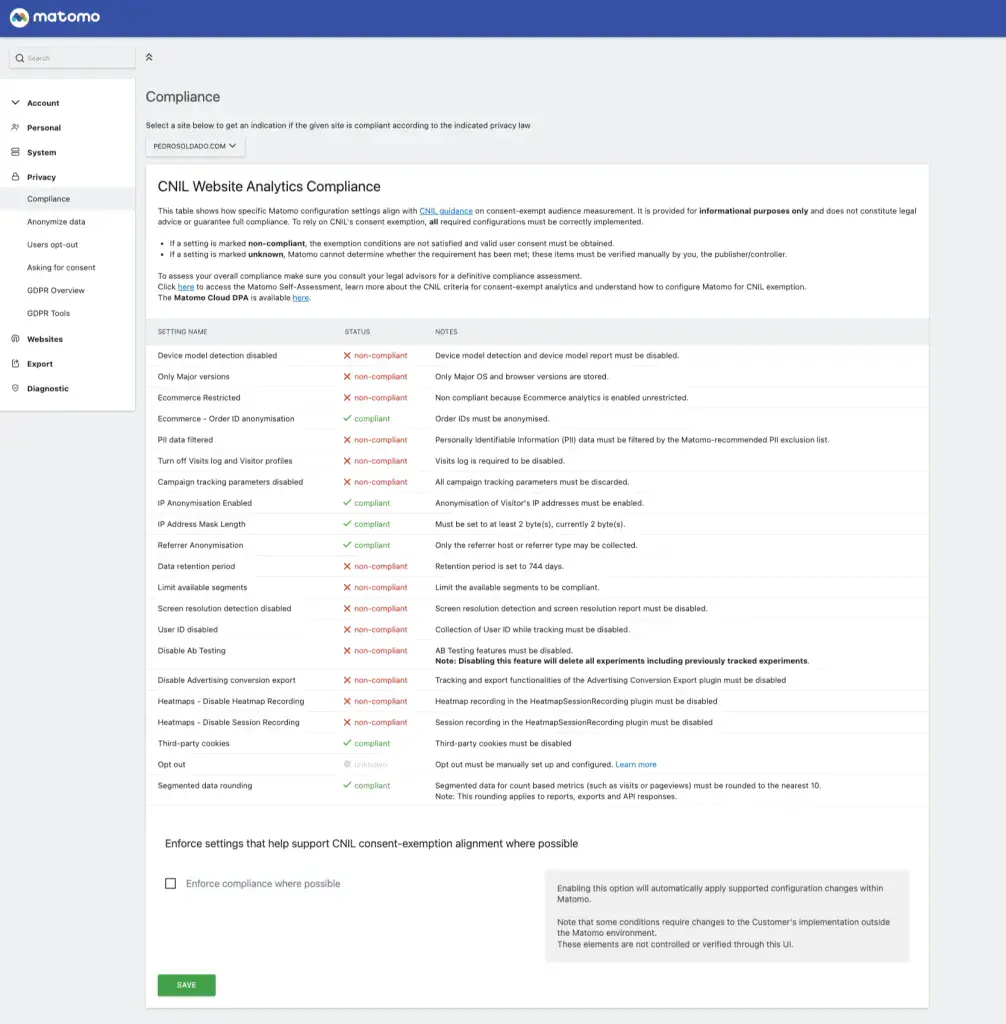
Once you’ve reviewed the results, enable “Enforce compliance where possible” and click Save. Matomo applies all supported settings in one go. The compliance page also links directly to the knowledge base and to the self-assessment document, which CNIL now requires analytics providers to make available to their customers.
What changes when you enable it
When CNIL mode is enforced, Matomo applies a restricted configuration for the selected site or app. That can include:
| Data collection and anonymisation | Individual-level data | Reporting and retention |
|---|---|---|
| – Visitors’ IP addresses are anonymised, with the mask set to two bytes. – Only first-party cookies are used. Cross-domain tracking is disabled. – Campaign parameters and advertising identifiers are stripped at ingestion and not stored. – Ecommerce tracking is set to restricted mode. Order IDs are anonymised, and identifying segments are disabled. | – Visits Log and Visitor Profiles are disabled. Only aggregated, anonymous statistics remain available. – Heatmaps and Session Recordings are disabled. – A/B Testing is disabled. Note that enabling compliance mode permanently deletes all existing experiments. | – Segmented data is rounded to the nearest ten to prevent singling out individuals. – The data retention period is automatically set to 180 days. |
This is what makes the feature useful in practice. It does not just tell you what the requirements are. It helps you apply the supported settings in one place and makes the remaining gaps visible.
What still requires a manual step
This is worth reading before you enable the feature:
The opt-out mechanism is not configured automatically. CNIL requires that visitors can object to audience measurement, and this must be embedded in your privacy policy as an iframe or link. The compliance page flags this with an “Unknown” status. The configuration guide walks you through the setup.
Any settings marked Unknown in your assessment also need manual review. Matomo cannot verify them from within the platform, and CNIL compliance cannot be confirmed until they are addressed.
Custom goals and events you create must stay within the three categories of events permitted by CNIL: presence on a page, use of a feature, and page performance statistics. Anything outside that scope falls outside the exemption.
Finally, this feature supports the compliance process. It does not replace legal review. If you operate in a regulated sector or manage compliance across multiple jurisdictions, your legal or privacy team should validate your configuration.
Where to start
It’s already available for superusers in Privacy > Compliance. The feature is live now on Matomo Cloud and available on Matomo On-Premise with version 5.9.0.
If you want to use Matomo in a way that may qualify for CNIL consent exemption when properly configured, start here:
- go to Administration > Privacy > Compliance
- select the relevant site
- review the assessment results
- enable Enforce compliance where possible
- complete the remaining manual steps, especially opt-out setup
- review the detailed self-assessment and knowledge base guidance for the full scope and restrictions
The full configuration guide and self-assessment document are available in our knowledge base:
- our English configuration guide
- our French configuration guide
- our technical documentation for 1-Click CNIL Compliance, with the CNIL self-assessment
- our opt-out setup guide
These resources explain the detailed conditions, scope limitations, and remaining manual actions required for your setup.
Analytics that are easier to review, easier to configure, and easier to trust
Privacy-conscious analytics should not require a maze of manual checks.
With 1-Click CNIL Compliance, Matomo gives your team a more direct way to assess its setup, apply supported CNIL-aligned settings, and document what still needs to be done.
It is a practical step toward analytics that are easier to configure, easier to review internally, and easier to operationalise across teams.
Learn more about this new feature here: How do I configure Matomo without tracking consent for French visitors (CNIL exemption)?