How to manage Custom Reports in report categories
When creating Custom Reports, you can place them under existing Matomo menu categories to organise related reports so they are easier to find.
Assign a Custom Report to a menu category
- In Matomo, open Custom Reports and create or edit a report.
- Define the report as required and scroll down to the Report page section.
- Select the Report category from the list of existing top level report menus in your Matomo instance.
-
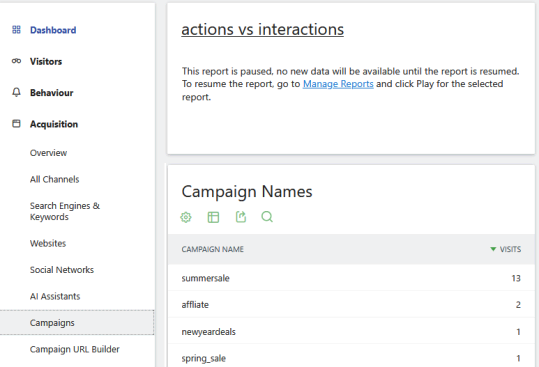
You can further select a Report subcategory where the report should appear. For example, the Custom Report actions vs interactions is added to Acquisition > Campaigns.

-
Save the report. It will then appear in the selected section of the Matomo navigation menu.
Display multiple Custom Reports on the same page
If several Custom Reports are assigned to the same Report category or subcategory, they appear together on the same page.
For example, create multiple reports related to campaigns and assign them to the same category. When you open that category in Matomo, the reports are displayed one below the other.
Reorder reports in a Custom Report subcategory
When multiple Custom Reports are assigned to the same subcategory, you can control their display order. Sorting is managed from the parent report that acts as the subcategory. The following example explains this further:
- Create a new report called Events and assign it to the Report category Custom Reports. This new Events report will act as the subcategory container.
- Create multiple reports assigned to the Report category, Custom Reports and the subcategory to Events.
- Open the Events custom report created in first step. Scroll to the Reports page section showing a list of custom reports assigned to the Events subcategory.
- Drag the items to reorder and save your changes.

After refreshing the page, the reports will appear in the updated order.
Grouping Custom Reports under the same category helps you build structured reporting sections within the Matomo interface. This approach is particularly useful when creating reporting dashboards for marketing, acquisition analysis, or campaign tracking.