
Set up Goals using Matomo Goal Recommendations
Tracking actions on your website helps you understand how visitors interact with your content and complete important activities. Matomo Goal Recommendations can analyse your website and suggest Goals you may want to track.
You can review these recommendations and create goals without manually configuring every goal condition. This also helps you discover new goals as your website changes.
Scan your website for Goal Recommendations
Matomo scans a limited number of publicly accessible pages to identify potential Goals. It uses signals such as page URLs, content and website structure to generate recommendations. Goals that already exist in Matomo are excluded from the suggestions.
By default, Matomo uses a rule-based algorithm without AI processing. No website data is sent to an external AI provider.
Run a scan
- Users need at least write permission to run scans or create goals.
- Log in to Matomo and select the website you want to analyse.
- Navigate to Goals > Manage Goals.
- Click Recommend Goals to scan your website and generate suggestions.
- Review the suggested goals in the Goal Recommendation section.

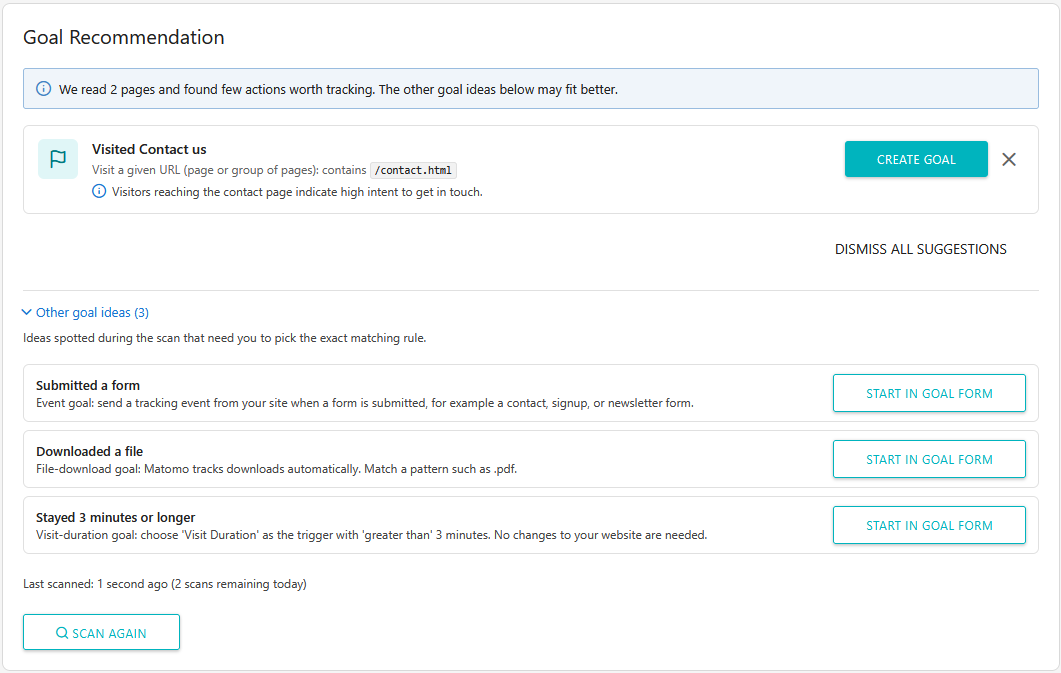
Review and create Recommended Goals
Matomo displays the recommended goals with a suggested name, tracking condition and a short explanation of why the goal may be useful. Review each recommendation and use the following options to add or exclude the suggested goals:
- Create Goal: Click to create a goal using the suggested tracking condition. If possible, Matomo automatically defines and creates the goal without manual setup.
- Dismiss (X): Remove an individual suggestion you do not want to use.
- Dismiss all suggestions: Remove all current recommendations.
- Other goal ideas: Expand this section to view additional goals that may require manual configuration.
- Start in Goal Form: Click to open the Goal configuration form so you can complete the setup.
- Scan again: Run another scan to check for new goal recommendations.
Some recommendations include a URL matching condition and can be created directly. Other suggestions, such as form submissions or file downloads, may require you to select or configure the appropriate tracking condition.
Limitations
- Your website must be accessible from your Matomo instance for the scan to work.
- Websites that use client-side rendering, such as single-page applications (SPAs), may not be scanned correctly.
Keep Goals up to date
As your website evolves, new content, features and visitor interactions may introduce additional actions worth tracking. Use Scan again periodically to check for new Goal Recommendations and review whether they align with your current objectives.

By reviewing Goal Recommendations regularly, you can discover new conversion opportunities, keep your tracking aligned with your website’s objectives and gain a more complete picture of how visitors interact with your website.