Google Analytics (GA) is the biggest player in the web analytics space. But dominance and reliability aren’t the same metric. Over the years, users have pointed out several major limitations in Google Analytics. Many of these are even more visible in Google Analytics 4.
Introduced in 2020, Google Analytics 4 (GA4) was received with a high degree of scepticism. Between a new data model and the removal of many familiar metrics, the platform created significant challenges related to how marketers and analysts collect and analyse website data.
Several years on from the introduction of GA4, users continue to find limitations in privacy and compliance, data retention, event modelling, and reports, leaving them frustrated. But even more critically, Google Analytics has been slow to roll out AI-tracking features, making it difficult to track traffic from AI chatbots. Let’s take a deeper look at those limitations and how they affect GA4 users today.
Key takeaways
- Google Analytics adoption is declining as its limitations become harder to ignore in an AI-driven web.
- GA4 only recently introduced AI traffic identification, but it lacks depth.
- Data sampling affects GA4’s most important reports, meaning the insights you rely on most may be based on modelled estimates.
- Standard GA4 implementations have been found non-compliant with GDPR by regulators in France, Austria and Denmark.
- Matomo tracks AI agents, AI assistants and AI chatbots crawlers separately, applies no data sampling, gives you full data ownership and is designed to support GDPR compliance.
The biggest limitations of Google Analytics (GA4)
Google Analytics 4 is advertised as a privacy-centred, comprehensive and “intelligent” web analytics platform. When Google launched GA4, the stated ambition was:
- Machine learning, at its core, provides better segmentation and fast-track access to granular insights
- Privacy-by-design controls, addressing restrictions on cookies and new regulatory demands
- More complete understanding of customer journeys across channels and devices
Some of these claims hold true. Others crumble upon a deeper investigation. Combined with a complex setup, poor UI and lack of support with migration, left many users frustrated with GA4.
Let’s unpack all the current (and legacy) limitations of Google Analytics you should account for.
1. Identifying AI traffic is not the same as understanding it
Google Analytics added AI traffic identification to GA4 in May 2026. But identification is just a starting point. The more useful question isn’t “did AI visit my site?” It’s “which AI, what did it do, did that lead to a visit, and is my site structured in a way that AI systems can understand and surface accurately?” Those questions require a different level of reporting.
Matomo has been developing AI traffic analysis since version 5.5.0, building out a suite of reports that goes considerably further. When AI assistants, such as ChatGPT, Claude, Copilot and similar tools recommend your site in a response, Matomo’s AI Assistants reports capture that referral activity and let you analyse how those visits behave over time.
As AI becomes an increasingly significant source of how content is discovered and surfaced, having detailed visibility into how these systems interact is operationally important.
2. No historical data imports
GA4 provided no way to import Universal Analytics data. This made years of benchmarks, seasonal trends and year-on-year comparisons difficult to analyse.
Matomo’s Google Analytics importer plugin solves this directly, bringing historical UA and GA4 data into one platform and restoring the long-term context that makes analysis meaningful.
3. Data collection limits
Google Analytics puts limits on data collection for event parameters and user properties. These apply to every event type in GA4, including automatically collected, enhanced measurement, recommended and custom events.
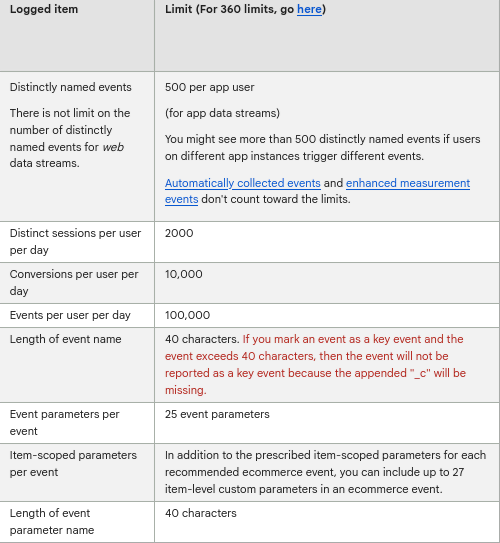
These limits sound generous until you’re an e-commerce site trying to track a purchase journey with details like product ID, category, subcategory, variant, price, discount applied, stock level, and seller type. You easily hit the ceiling without even touching user-level data.
On top of the per-event parameter cap, GA4 limits data at the property level:
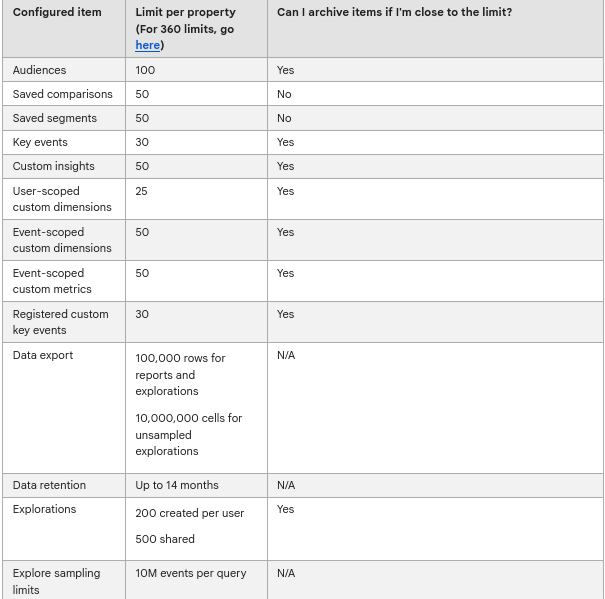
For businesses running personalisation at scale or tracking rich product attributes throughout a multi-step funnel, these caps force uncomfortable choices. Which data do you keep? What do you cut? And if you later decide a dropped dimension was actually important, adding it back means losing historical continuity for that field.
Higher limits are available through Google Analytics 360, but at a price point that makes it inaccessible for most organisations.
Matomo doesn’t work this way. There are no imposed limits on custom dimensions or event parameters. You collect what your business needs, at whatever depth makes sense, without being funnelled toward a higher pricing tier to do it properly.
4. Limited GDPR compliance
Google Analytics and GDPR have never had a clean relationship, and despite some updates, they still don’t.
The Privacy Shield framework that once governed EU-US data transfers was invalidated by the CJEU in 2020. Its successor, the EU-US Data Privacy Framework (DPF), arrived in 2023 and restored a legal basis for those transfers. A challenge was filed but dismissed in September 2025.
Regulators across Europe haven’t held back:
- French data protection authority, CNIL, ruled that “the transfers to the US of personal data collected through Google Analytics are illegal” and ordered the company to comply.
- Austria found GA4 in breach of GDPR.
- Denmark’s data protection authority concluded that standard GA4 use is incompatible with GDPR requirements.
These, in turn, can directly affect Google Analytics users, whose businesses could face brand damage and regulatory fines for non-compliance. In fact, companies cannot select where the collected analytics data will be stored on European servers or abroad, nor can they obtain this information from Google.
Server-side tagging is also available, which lets you process data on your own servers. But these are not defaults. You need to make manual configurations, and there is real room for error.
Matomo is designed to support GDPR compliance from the start. You own where your data is stored, whether that’s your own servers or a specific cloud region.
5. Heavy reliance on sampled data
To compensate for ditching third-party cookies, GA4 relies more heavily on sampled data and machine learning to fill reporting gaps.
In GA4, sampling automatically applies when you:
- Perform advanced analysis such as cohort analysis, exploration, segment overlap or funnel analysis with not enough data
- Have over 10 million data rows and generate any type of non-default report
Google also notes that data sampling can occur at lower thresholds when you are trying to get granular insights, and there isn’t enough data or when Google thinks it’s too complex to retrieve.
Data sampling adds “guesswork” to your reports, meaning you can’t be 100% sure of data accuracy.
Unlike Google Analytics 4, Matomo applies no data sampling. Your reports are always accurate and fully representative of actual user behaviours.
6. No proper data anonymisation
Google Analytics 4 anonymises all user IP addresses, an upgrade from Universal Analytics (UA), and it’s worth acknowledging.
But GDPR’s definition of personal data extends well beyond IP addresses, cookies, device IDs and other pseudo-identifiers, all of which count as personal data when they can be used to single out an individual even without a name or email address attached. GA4 still assigns a unique user ID to each visitor. These count as personal data under GDPR.
For comparison, Matomo provides more advanced privacy controls. You can anonymise:
- Previously tracked raw data
- Visitor IP addresses
- Geo-location information
- User IDs
This can ensure compliance, especially if you operate in a sensitive industry and delight privacy-minded users.
7. No roll-up reporting
With Roll-Up Reporting, you can see global-performance metrics for multiple localised sites (.co.nz, .co.uk, .com, etc), regional domains and separate apps in one dashboard. Then zoom in on specific localised sites when you need to.
In GA4, it exists. But it’s locked behind Google Analytics 360. Even with GA360, you need to configure a dedicated roll-up property from scratch, with careful alignment of event naming conventions and data streams across every property.
Matomo includes roll-up reporting as standard. It allows you to aggregate data across all your sites and apps in one dashboard, drill into individual properties when you need to, and do all of it without any manual configuration or enterprise pricing tier.
8. Report processing latency
GA4’s data is never as fresh as it looks. Standard GA4 properties can take 24 to 48 hours to fully process data, and some data tied to specific features or integrations can take up to 72 hours to appear. Until processing is complete, your reports are only showing a half picture.
This is a significant drawback during one-day promo events like Black Friday or Cyber Monday, when up-to-date data is critical for real-time decision-making.
Matomo processes data with lower latency even for high-traffic websites. Currently, we have 6-24-hour latency for cloud deployments. On-premises web analytics can be refreshed even faster, within an hour or instantly, depending on the traffic volumes.
9. No native conversion optimisation features
Google Analytics users have to use third-party tools to get deeper insights, like how people are interacting with your webpage or call-to-action.
Matomo comes with a native set of built-in conversion optimisation features:
- Heatmaps
- User session recording
- Sales funnel analysis
- A/B testing
- Form submission analytics
10. Deprecated annotations
Annotations come in handy when you need to provide extra context to other team members. For example, point out unusual traffic spikes or highlight a leak in the sales funnel.
This feature was available in Universal Analytics but is now gone in Google Analytics 4. Google later introduced “Notes” as a replacement, but Notes don’t work the same way. They lack the in-report visibility that made annotations useful.
With Matomo, you can quickly capture, comment and share knowledge with your team. You can add annotations to any graph that shows statistics over time, including visitor reports, funnel analysis charts or running A/B tests.
11. No white label option
White labelling enables you to adjust the looks and feels of a software exactly like a proprietary tool built by your company. Google Analytics does not offer white-label analytics, but other web analytics solutions like Matomo do let you white-label your analytics dashboard.
12. Limited data retention and raw data access
GA4 defaults to two months of event-level data retention, with a maximum of 14 months. Beyond that threshold, detailed event data gets deleted. It gets replaced by aggregated metrics that can’t be drilled into, verified against source events or used for precise behavioural analysis.
Similarly, raw event-level access requires exporting to BigQuery, which costs a significant technical overhead and ongoing infrastructure costs.
Matomo imposes no retention limits. Your event-level data stays indefinitely, with direct SQL and API access built in.
13. Heavily dependent on Google’s ecosystem
GA4 works best with Google’s suite of tools. Raw data access requires BigQuery, tag management requires Google Tag Manager and attribution depth needs Google Ads integration. Each integration adds another dependency on a platform you don’t control.
Matomo operates independently of Google’s ecosystem entirely. Raw data is accessible directly, and tag management is already built in. Its on-premise deployment means your analytics infrastructure will run on your own servers, with no third-party dependencies and no exposure to Google’s product or pricing decisions.
Time to close the gap
Google Analytics inherent limitations around privacy, reporting and deployment options prompt more users to consider GA4 alternatives, like Matomo.
With Matomo, you can easily migrate your historical data records and store customer data locally or in a designated cloud location. Every report is based on complete, unsampled data and provides an array of privacy controls for advanced compliance.
Start your 21-day free trial (no credit card required) to see how Matomo compares to Google Analytics.
FAQs
What are the limits and quotas in Google Analytics?
GA4 is a free analytics tool, but it operates with limits that affect what you can track, how long you can keep data and how reliably you can access it.
Custom dimensions are capped at 50 event-scoped and 25 user-scoped per property. Each registered dimension counts toward the quota even after deletion. Data sampling gets automatically applied after 10 million events, which can be easily hit by high-traffic websites.
Additionally, standard GA4 properties are limited to 10 concurrent API requests and 200,000 tokens per day, with a further cap of 14,000 tokens per project per property per hour. This means a busy executive dashboard shared across multiple teams can exhaust its hourly quota before the working day is over.
The user-level and event-level data are retained for a maximum of 14 months on standard GA4 properties. Removing most of these limits requires upgrading to Google Analytics 360, which starts at $50,000 per annum.
How to track AI traffic in GA4?
GA4 added AI traffic identification in May 2026, enabling users to record visits from AI assistants in their reports. You can view AI traffic by going to your Reports > Acquisition > Traffic Acquisition and then selecting the Session Default Channel Group dimension. AI Assistant appears as its own row. GA4 applies no retroactive reclassification, so all AI traffic before May 2026 remains attributed under previous channel logic.
The limitations, however, are significant. Google does not publish which AI platforms qualify for the channel, meaning you cannot verify whether a specific platform is being tracked, and classifications can shift without warning. The entire system depends on referrer data being passed correctly. If there’s no referrer, GA4 registers it as Direct traffic with no indication of its AI origin.
What are the things that Google Analytics can’t tell you?
Despite being the most widely used analytics platform, GA4 has blind spots that affect the quality and completeness of its reports.
To date, GA4 can’t track AI chatbot crawlers that retrieve content server-side, and it doesn’t separate AI agents from AI assistants. It can’t give you unsampled data for complex queries or large datasets. It can’t tell you with certainty that your analytics setup is GDPR-compliant. It can’t show you a consolidated view across multiple properties unless you’re on Google Analytics 360.
For a more complete picture, including AI traffic analysis, unsampled reporting and granular privacy controls, Matomo is worth comparing directly.
Does Google Analytics violate GDPR?
Several European data protection authorities have concluded that standard GA4 implementations are incompatible with GDPR. France’s CNIL, Austrian regulators and Denmark’s data protection authority have all issued rulings against GA4.
That said, a correctly configured GA4 setup with consent mode, server-side tagging, and appropriate data retention settings may reduce compliance risk.
For businesses that want analytics designed to support GDPR compliance from the ground up, tools like Matomo offer full data residency control and privacy settings built for today’s regulatory environment.
Do I need consent for Google Analytics?
In most jurisdictions, yes. GA4 uses cookies and assigns unique identifiers to users, both of which constitute personal data under GDPR. That means a lawful basis for processing is required, and for most websites, that basis is consent. Without a properly configured cookie banner and consent mechanism in place, running GA4 is likely non-compliant in the EU.
It’s worth noting that cookieless tracking in GA4 doesn’t automatically exempt you from consent requirements, either pseudo-identifiers like device IDs can still fall within GDPR’s scope.